
ESCAPE FROM TARKOV
Survive the Interface: Redesigning Tarkov’s Inventory UX for Speed and Clarity
A partial reimagining of Escape from Tarkov’s interface to reduce friction, enhance user focus, and maintain immersion in one of the most intense looter-shooters on the market.
Problem & Goals
Escape from Tarkov’s interface introduces unnecessary friction in both survival and social systems.
Players must open the inventory for basic real-time information, like health, hydration, buffs, or
grenade type, interrupting the flow of gameplay. Social features are also limited or inefficient —
there’s no way to view online friends, create squads, or message teammates easily. Combined with missing
presets and redundant workflows, even simple tasks like buying or crafting items become slow and
frustrating.
- Reduce time spent on essential actions like buying, crafting, and communicating
- Surface key survival stats without breaking immersion
- Improve the visibility and flow of social features (online status, team invites, messaging)
- Streamline the interface to support faster decisions in high-stakes scenarios
Research & Discovery
To identify key UI and accessibility pain points in Tarkov by gathering feedback from diverse players,
focusing on improving information clarity, social features, and inventory interactions.
Key findings from User Interviews
- Information Gaps: Players struggle to find critical status info (buffs/debuffs, hydration, health,
compass) without opening the inventory.
- Social Friction: Friend list lacks online status visibility and makes group creation unintuitive;
players can’t send invites from raid lobbies.
- Grenade Frustration: 80% of players throw grenades without knowing the type; only a few bind grenade
types manually at raid start.
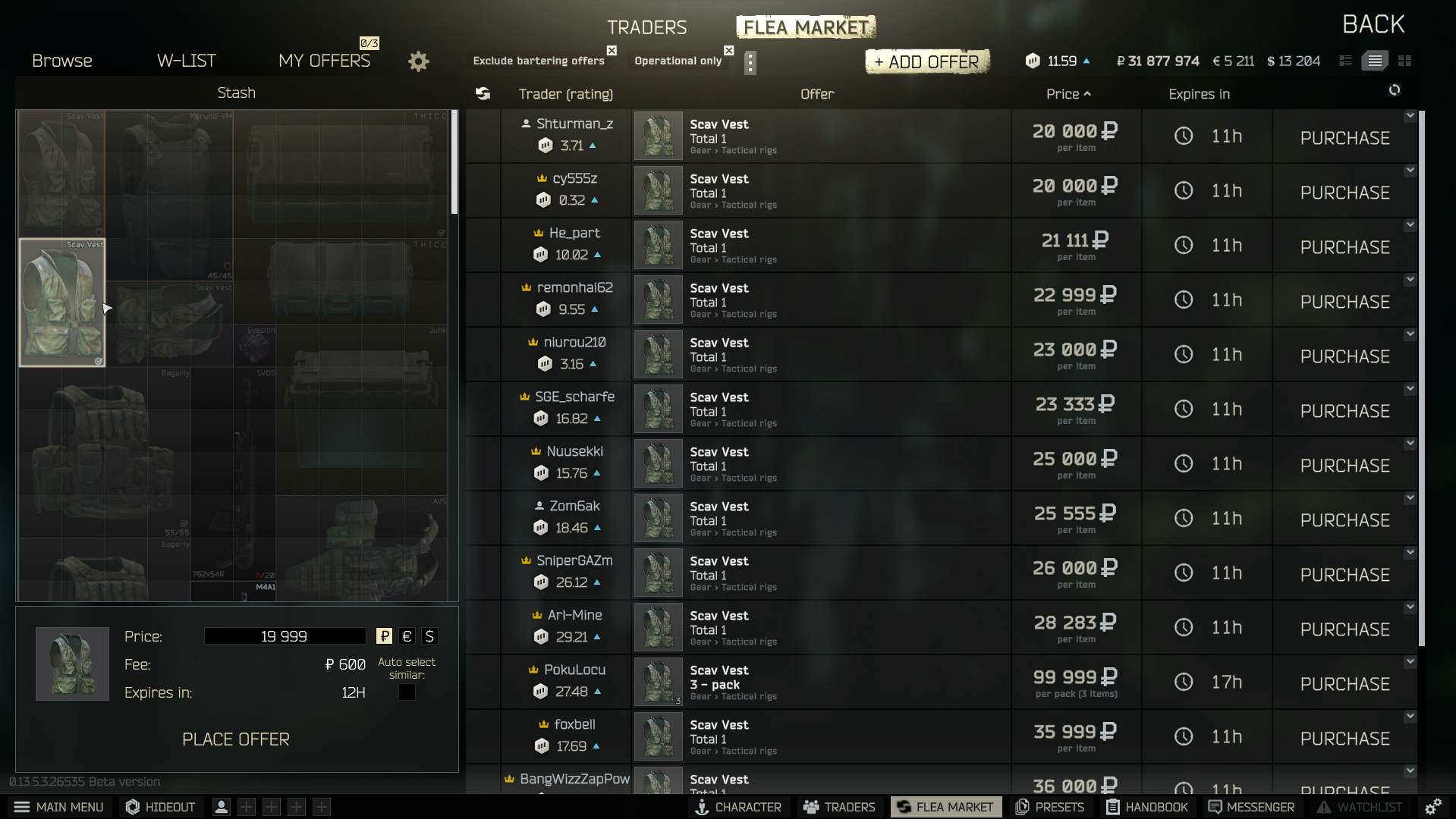
- Marketplace Overload: Majority spend their time in the Flea Market selling, which is repetitive and
poorly optimized.
- Crafting Inefficiency: Users must manually look up crafting recipes each time, causing unnecessary
friction.
- Quest Confusion: Players frequently search third-party websites for quest locations, indicating a
lack of in-game guidance.
Competitive Analysis
To benchmark Tarkov’s UI, I analyzed similar games across key areas like crafting, in-raid feedback, and
social systems. This revealed clear usability gaps and informed design opportunities.
Features & Tasks
Social & Grouping Systems
In-game friend list but no online status or join lobby options. No friend requests in raid lobby
Full friend system with online status and easy party formation. Friend requests from group
interface.
No in-game friend list; group invites require user IDs. Less intuitive group formation.
Inventory & Crafting UI
FComplex inventory and crafting system. Powerful weapon customization but overwhelming. Mission
info often hidden. Fast trader switching via shortcuts
Typical FPS inventory, no crafting. Intuitive weapon customization. Clear mission assignments
Classic RPG-style inventory and crafting. Intuitive but punishing. Clear stash UI, no trader
shortcuts
In-Raid HUD & Vital Information
Shows raid time, posture, vital stats, hot bar. Inventory opened manually
Displays map, raid time, stats, compass, weapon shortcuts with grenade type commands
Shows map, raid time, stats, buffs/debuffs, compass, hot bar. Inventory manual access
Weapons & Utility Shortcuts
Predetermined weapon shortcuts; utility items assigned manually
Predetermined shortcuts for weapons and utilities
Shortcuts exist but must be placed manually
Visual Design & Thematic Consistency
Realistic post-war environments; gritty, immersive detail
Vibrant landscapes mixing nature and war zones
Dark, tense RPG dungeon style atmosphere
Key Competitive Analysis Findings:
- Social Systems: Tarkov lacks online status indicators and easy lobby joining compared to competitors like Warzone DMZ
- Inventory Management: Tarkov's system is powerful but overwhelming; competitors offer more intuitive experiences
- In-Raid Information: Missing compass and clear utility shortcuts that other games provide
- Weapon Shortcuts: Manual utility assignment creates friction compared to predetermined systems
- Visual Design: Maintains strong thematic consistency with realistic post-war environments
Define (Syntesis)
Key Insights
- Tarkov’s full HUD hiding enhances immersion.
- Competitors like Dark and Darker improve awareness with buffs/debuffs and compass overlays.
- Social usability (e.g. friend status visibility, group tools) is a key advantage in Warzone but missing in Tarkov.
Carlos, the Hardcore Strategist
Hardcore FPS & RPG Player
Basic Info
- Age: 24
- Occupation: Barman
- Location: Dublin, Ireland
Behaviors & Habits
- Plays games 6 days a week
- Prefers multiplayer games with friends
- Likes realistic mechanics
- Searches for tutorials and new team members online
- Shares gaming content regularly
Goals
- Quick access to critical raid info
- Efficient crafting and item management
- Seamless squad formation and communication
Frustrations
- Cannot see online friends’ status
- Died selecting flash bangs in-raid
- Buff/debuff timers not visible in gameplay
- Needs to look outside game for mission info
- Spends too much time crafting and buying items
“I love Tarkov, but I shouldn’t need three tabs open just to survive a raid.”
Emma, the Casual Explorer
Casual & Social Gamer
Basic Info
- Age: 21
- Occupation: University Student
- Location: Lisbon, Portugal
Behaviors & Habits
- Plays 1–2 times a week
- Likes games with a casual or social focus
- Avoids overly complex mechanics or menus
- Often frustrated by cluttered UI and hidden information
Goals
- Wants to spend more time enjoying the game, less time figuring out UI
- Needs better onboarding and clear feedback
- Values clarity, ease of use, and helpful guidance
Frustrations
- Struggles with UI complexity, navigation, and learning curve
- Gets lost in menus or misses important info
- Finds learning curve steep and overwhelming
“Playing should be fun, not frustrating.”
User Journey Map: Carlos Needs to Throw a Grenade Under Pressure
Stage
Action
Thoughts
Emotions
Pain Points
Opportunities
1. Enemy approaching
Hears enemy movement nearby
“I need to frag them before they push.”
😬 Alert
Must react fast—needs instant grenade access
Add a quick‑select grenade wheel
2. Realizes grenade not equipped
Glances at hotbar and sees no grenade assigned
“I forgot to slot my grenades.”
😰 Pressured
Grenades must be pre‑assigned; slows reaction
Auto‑slot last‑used grenades or drag‑to‑throw
3. Opens inventory
Opens inventory to assign a grenade
“Wasting time opening my bag.”
😖 Frustrated
Takes eyes off fight; vulnerable
Inventory‑free selection UI (radial/context menu)
4. Assigns to slot
Drags grenade to hotbar slot
“Hope I finish before they push.”
😓 Anxious
Slot management is slow mid‑combat
Hold‑to‑open grenade menu for assignment
5. Attempts to throw
Presses G → throws grenade from slot 1 by default
“Wrong type—now I’m exposed!”
😡 Irritated
Default key cycles slot order; no way to pick specific grenade fast
Implement a grenade quick‑select wheel or cycle toggle
Carlos's Grenade Challenge - Key Pain Points:
- Immediate Need: Enemy approaching, needs quick grenade access for tactical advantage
- Discovery Problem: Realizes grenades aren't pre-assigned to hotbar, causing hesitation under pressure
- Vulnerability Window: Must open inventory mid-combat, taking focus away from enemy threat
- Slow Assignment: Manual drag-and-drop to hotbar slots wastes precious time
- Wrong Selection: Default grenade key throws wrong type, exposing player to danger
Solution Opportunity: Implement quick-select grenade wheel and auto-slot system for faster combat response.
Feature Priorization Table
A UX/UI redesign for Escape from Tarkov focused on reducing interface friction and improving real‑time interactions. Key enhancements include upgraded friend lists, more intuitive in‑raid HUD elements, and streamlined pre‑raid workflows — all aimed at boosting usability and immersion.
Feature
Priority
Category
These 'Must Have' features form the core improvements necessary for enhancing gameplay and social interaction. Create the status feature inside the friend list (online/offline/occupied) Must Have Friend List & Social Add members of group as friends directly from the pre-raid screen Must Have Friend List & Social Display buffs/debuffs and character info outside inventory Must Have Combat Enhancements Grenade and Healing wheel for faster selection Must Have Combat Enhancements Display Compass, world time, and weather in raid Must Have Combat Enhancements Create a better layout on the “Change Region” section on game launcher Must Have UI/UX Improvements Save pre-set of Post Effects and configs across wipes Must Have Quality of Life Amplify typography size setting Must Have Accessibility Cloud save settings option Must Have Quality of Life The 'Should Have' features add meaningful refinements that support and expand the core experience. Send messages button direct into friend list Should Have Friend List & Social Create a group system inside the friend list Should Have Friend List & Social Improve contrast of unavailable servers in launcher Should Have UI/UX Improvements Display opened boxes on top of inventory Should Have UI/UX Improvements Add offer doesn't open in a pop-up window (new layout) Should Have Marketplace & Economy Move “add friend button” from “messages” section to “friend list” section Should Have Friend List & Social Display necessary XP to level up Should Have UI/UX Improvements The 'Could Have' features are nice-to-haves that would further polish the interface but are lower priority. Change iconography for barter necessary items Could Have UI/UX Improvements Money conversion tooltip on hover Could Have Marketplace & Economy Change friend list layout (pin to side) Could Have UI/UX Improvements Open market in a new layout inside crafting section Could Have Marketplace & Economy Display shortcuts and search bar in statistics section Could Have UI/UX Improvements The 'Won’t Have': Lower-priority or strategically deferred items.. Separate vendor messages from user messages Won’t Have Friend List & Social Filter by item opens multiple windows without closing old Won’t Have UI/UX Improvements Display profile and account info in a friend list popup Won’t Have Friend List & Social
Ideate and Design
UX User Flow
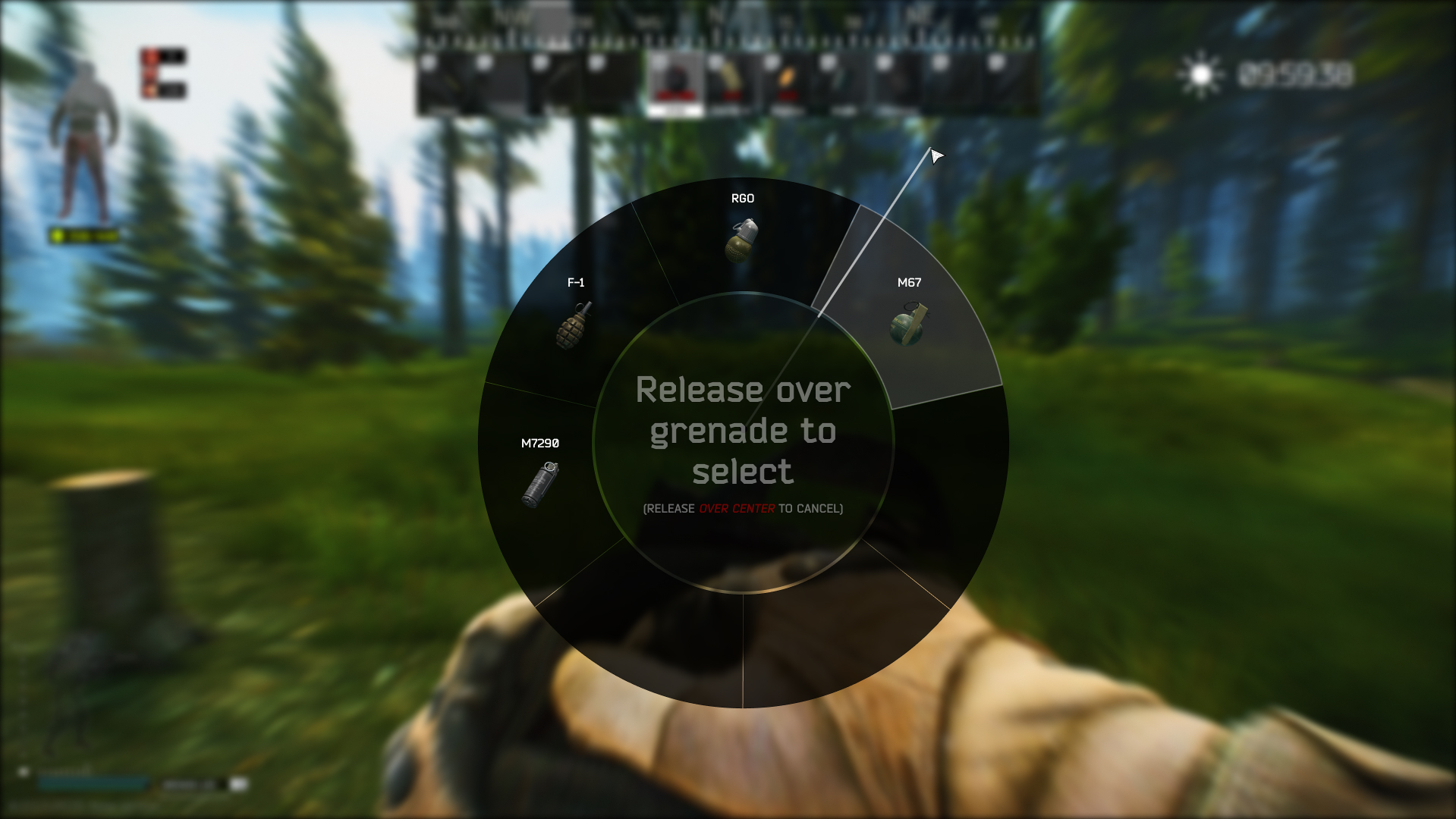
This flow starts with game launch and loadout prep, followed by combat decisions. If the player is shot, they can quickly heal via a shortcut-activated wheel. Grenade selection is also streamlined through a radial menu. These adjustments reduce downtime, increase responsiveness, and enhance focus during critical gameplay moments.
Start
↓
Open the Game
↓
Main Menu
↓
Prepare Loadout
↓
Start Raid
↓
Engage in Conflict
↓
Did player get shot?
YES
Check Health
↓
Need healing?
YES
Open Healing Wheel
↓
Hold Heal Shortcut
↓
Apply Healing
↓
Continue Fighting
NO
Continue Fighting
NO
Continue Fighting
↓
Need grenade?
YES
Open Grenade Wheel
↓
Select Grenade Type
↓
Throw Grenade
↓
Continue Fighting
NO
Continue Fighting
↓
Execute the Plan
↓
End (Raid Continues)
Low-Fidelity Wireframes
Design Simplification & Early Concepts
These initial sketches explore fundamental improvements to Tarkov's most problematic user interactions. Each concept focuses on reducing friction and cognitive load while maintaining the game's hardcore aesthetic. Through rapid ideation and low-fidelity wireframes, I tested various approaches to core problems like friend management, raid coordination, and in-game awareness before committing to detailed designs.
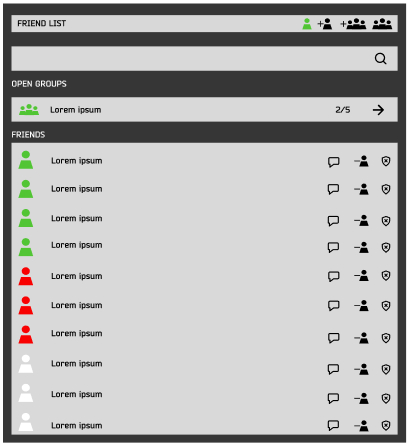
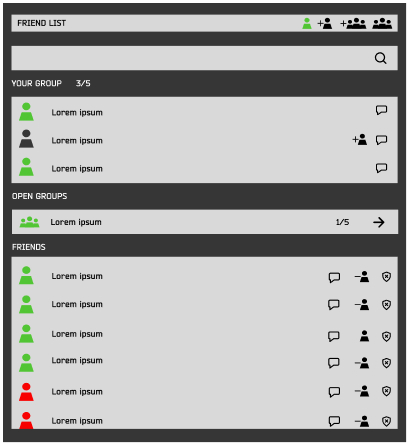
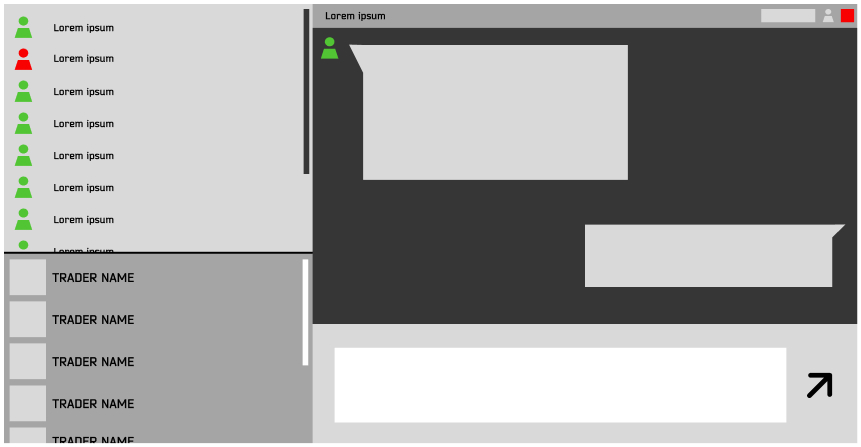
Friend System Overhaul
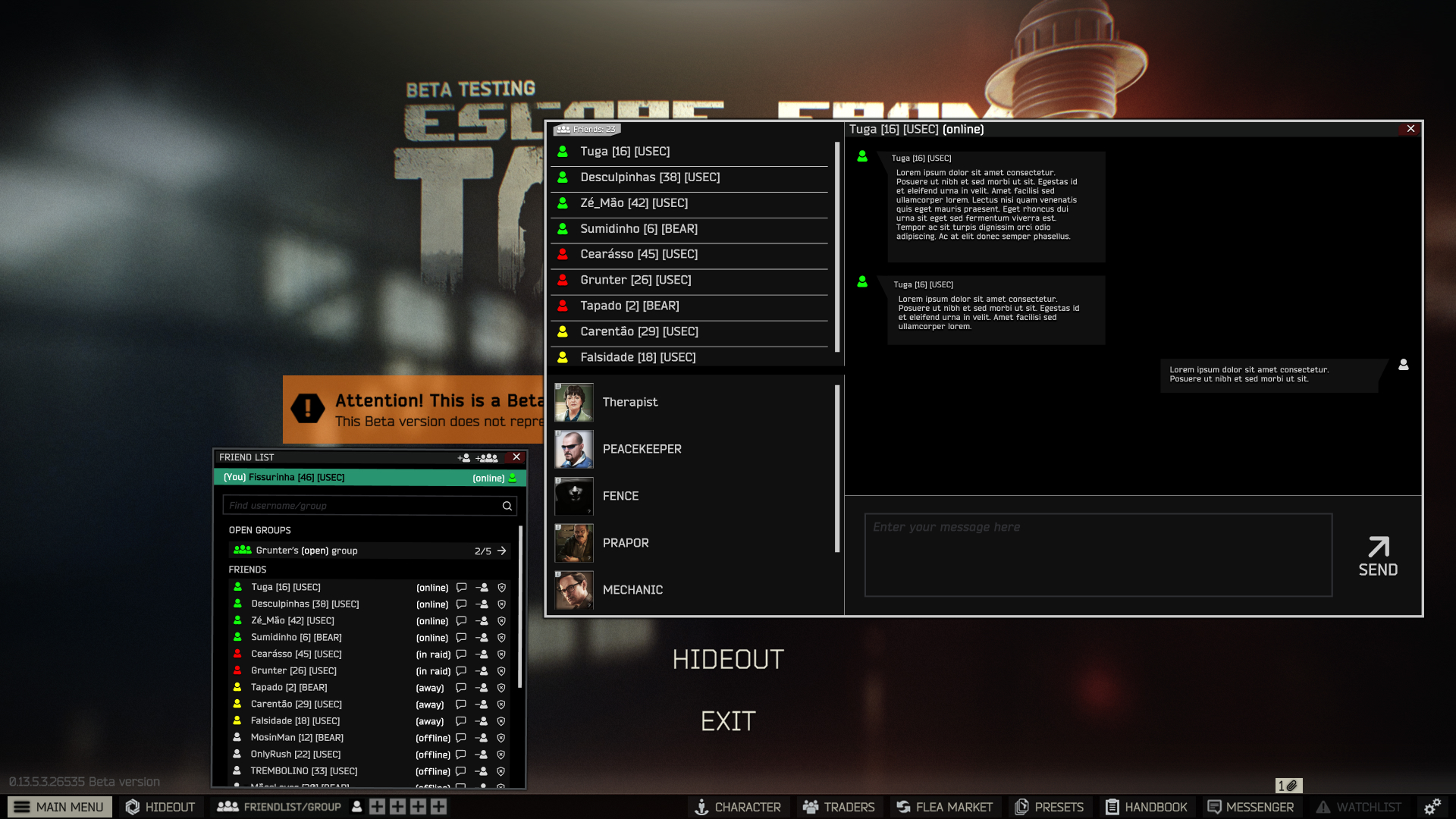
Goal: Reduce social friction and improve clarity by introducing status indicators, friend requests, and group features.
Improved friend management and clarity by adding status icons, direct friend requests, and group functionality. Designed to reduce friction and support social interaction
Pre-Raid Group Coordination
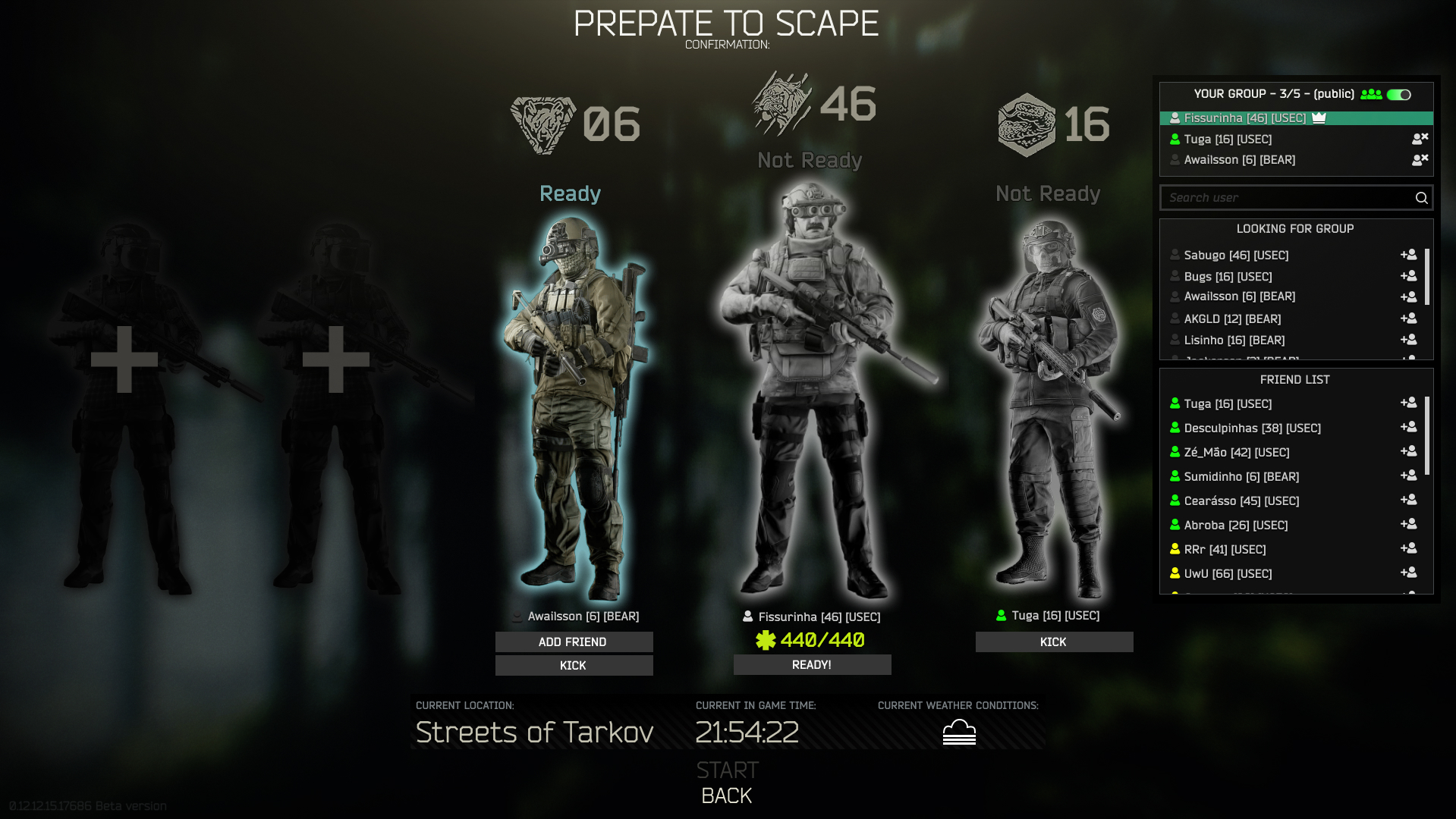
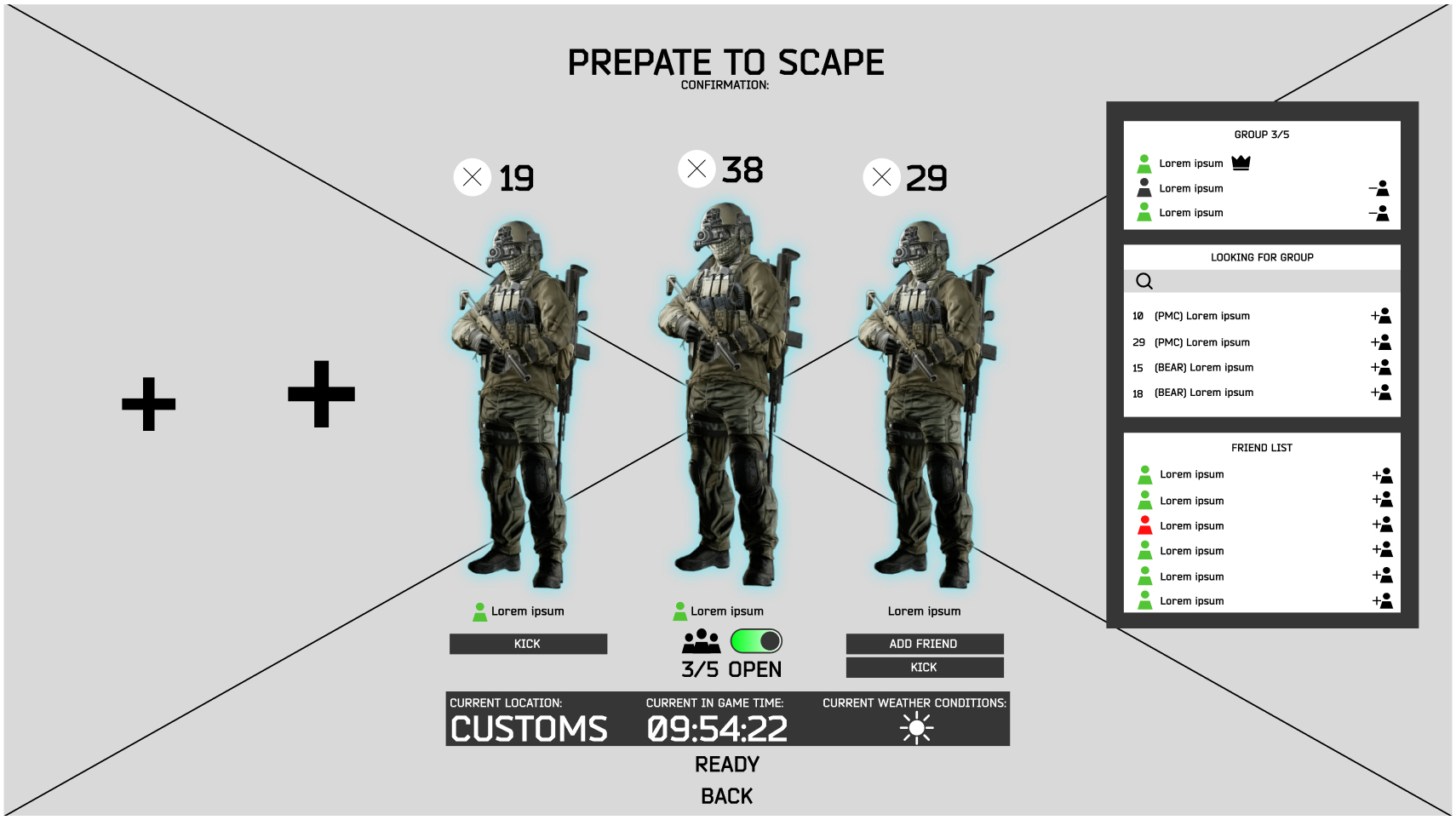
Goal: Streamline team readiness with a 'Ready' state, inline friend list access, and invite/kick controls.
Streamlined team readiness with a "Ready" button for all members. Added friend invite/kick options and real-time friend list access to improve flow before raids.
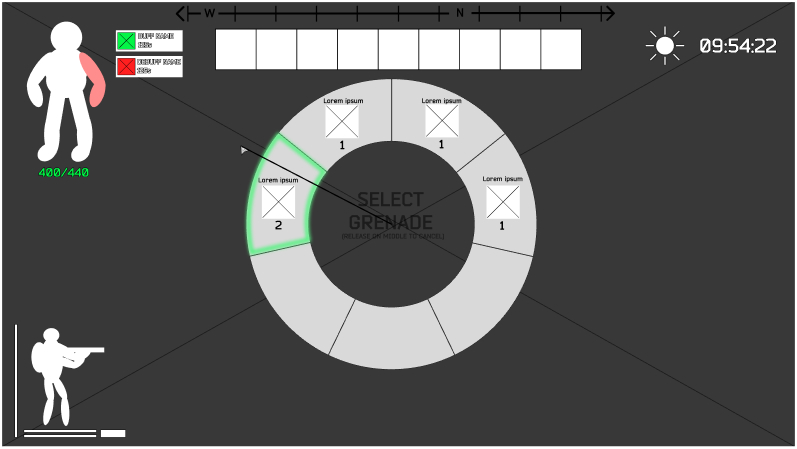
Raid UI Enhancements
Goal: Boost in-raid awareness and efficiency with always-visible health info, overlays for grenades and healing, and contextual HUD elements.
Boosted in-raid awareness with always-visible health, buffs/debuffs, and optional overlays (weather, compass, time). Introduced a contextual grenade wheel with focus blur for clarity.
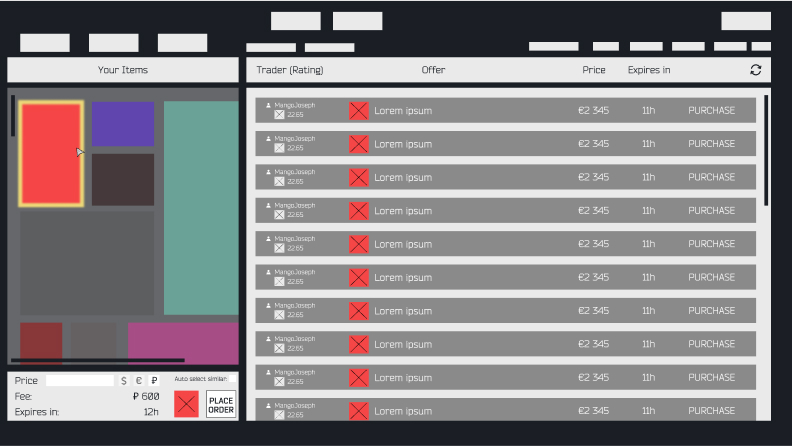
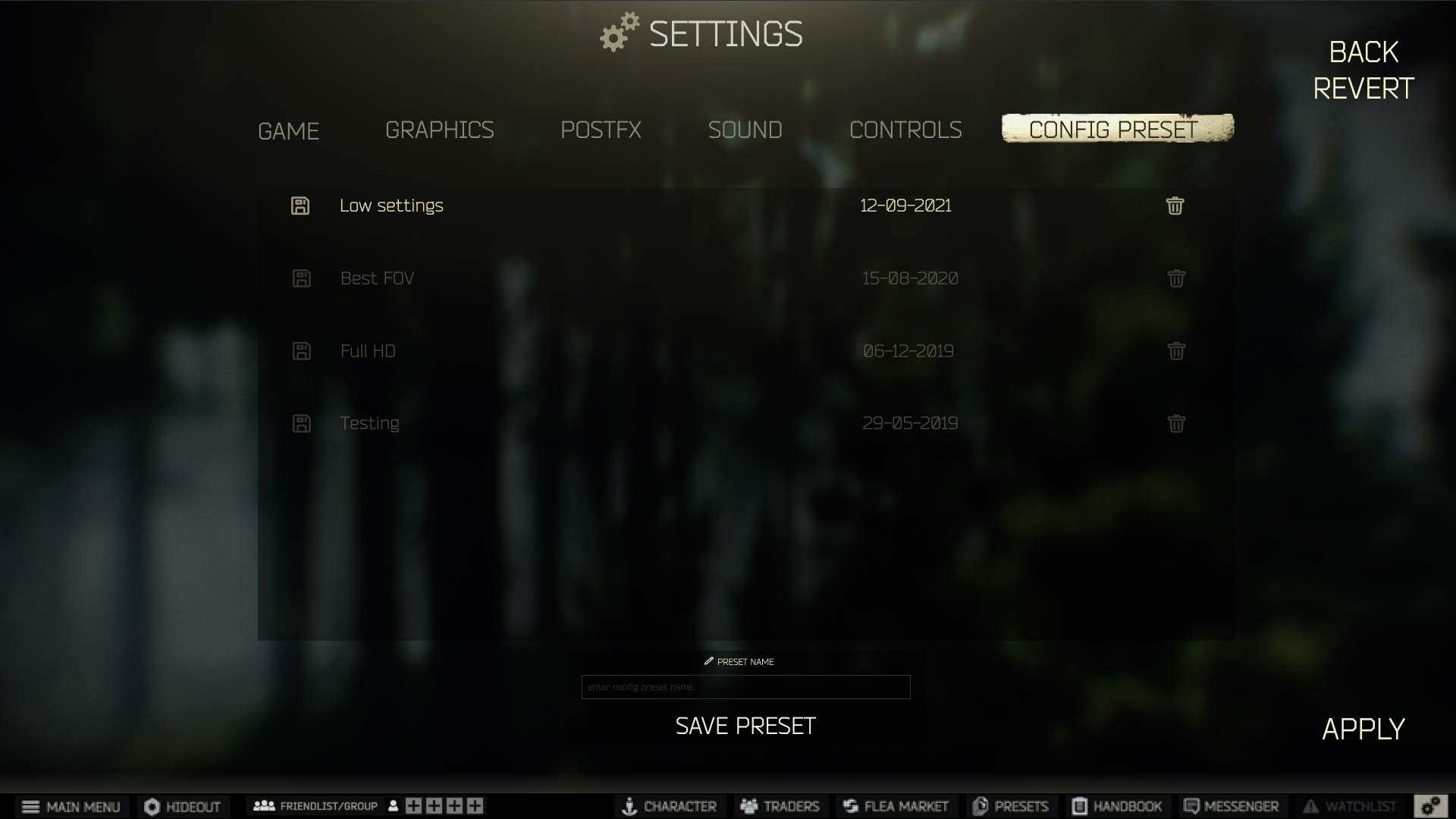
PostFX & Flea Market QoL
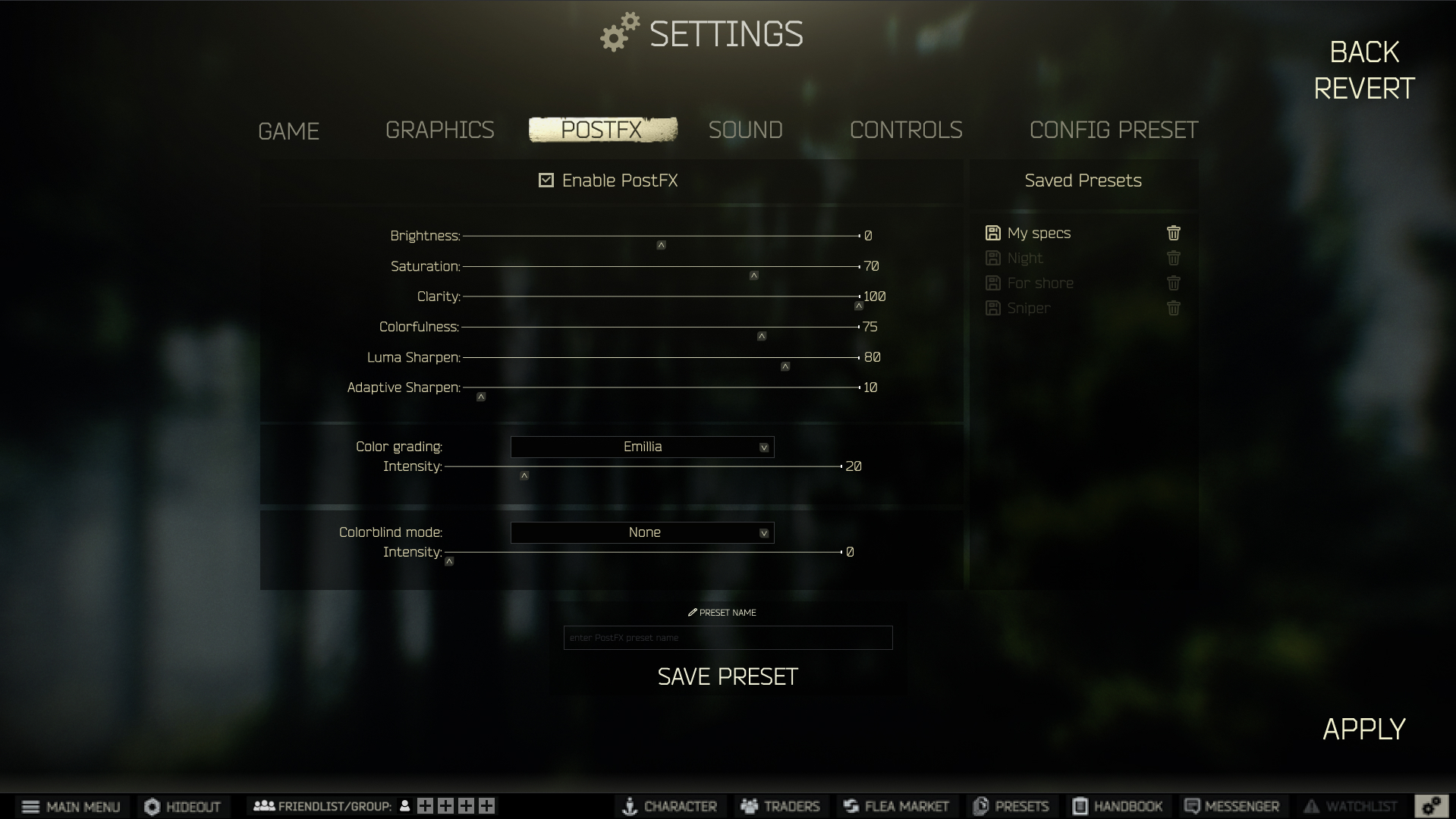
Goal: Minimize screen switching and simplify item management with presets and inline market interactions.
Reduced screen switching by embedding item filtering and trading actions directly into context. Users can now manage PostFX presets intuitively.
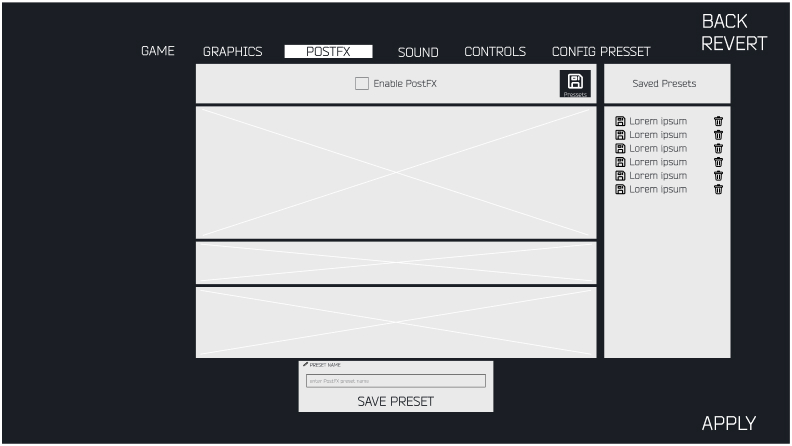
Settings Enhancements
Goal: Speed up visual customization and trading setup with PostFX presets and a streamlined flea market overlay.
Identified friction in visual and market settings. Introduced PostFX presets for faster customization and a streamlined flea market overlay to reduce navigation steps and speed up item interactions.
High-Fidelity Design
Refined Design Solutions & Implementation
Building on the early concepts, these high-fidelity designs showcase the final visual direction and detailed interactions. Each solution addresses specific user pain points identified during research, with refined aesthetics that maintain Tarkov's authentic feel while dramatically improving usability and workflow efficiency.
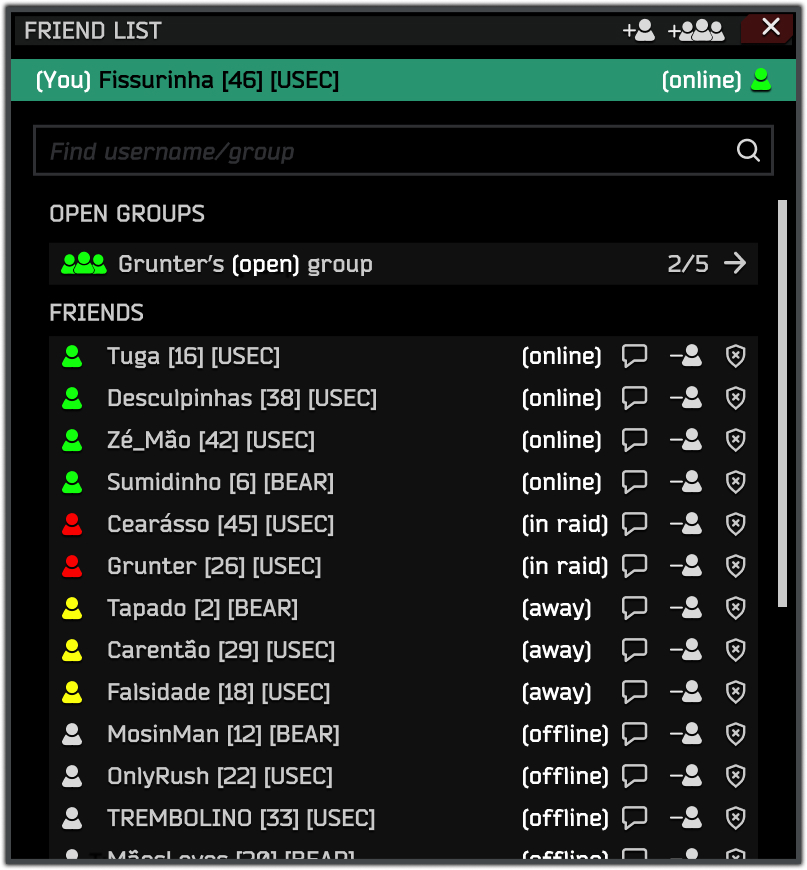
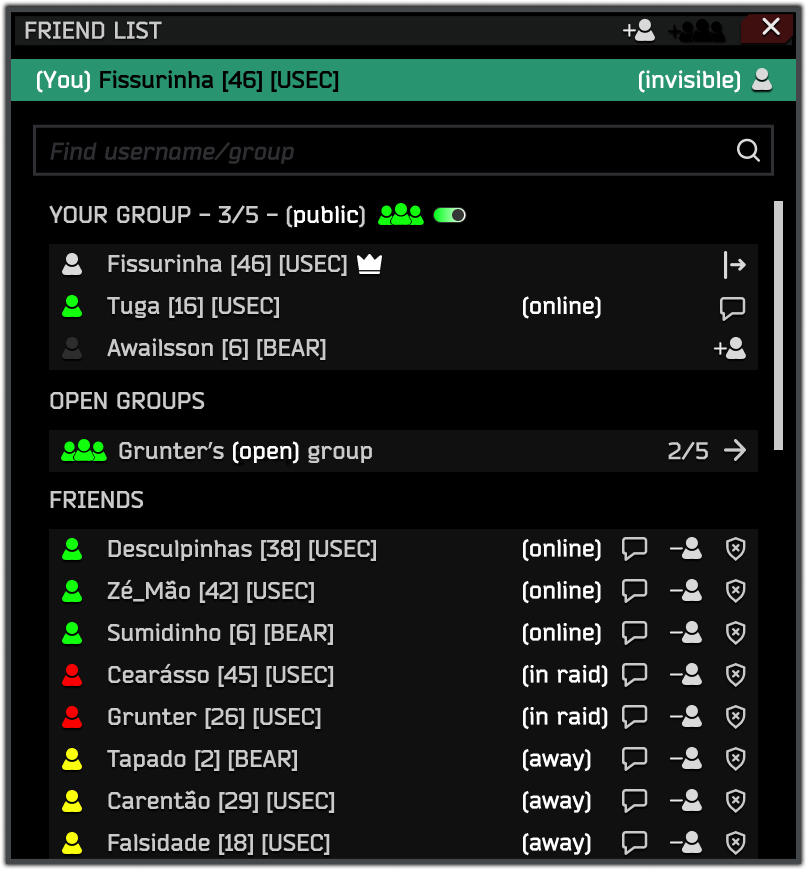
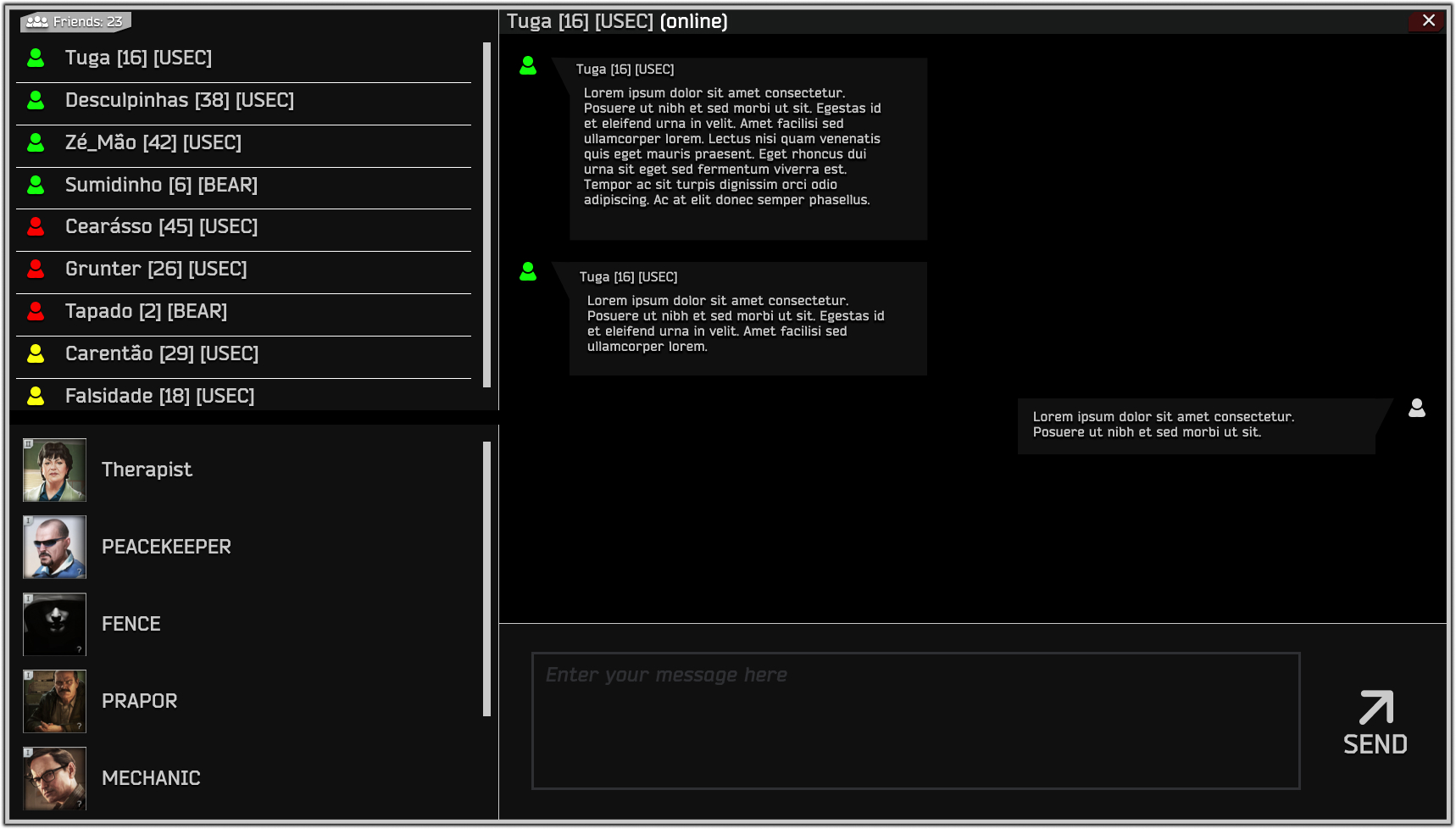
Friend System Overhaul
Goal: Reduce social friction and improve clarity.
Key Changes:
- Clear status indicators (online, in raid, away, hidden)
- Direct friend request and accept flows
- Group creation with public/private toggle
Pre-Raid Group Coordination
Goal: Improve team flow and readiness.
Key Changes:
- "Ready" state required for all members before raid
- Kick/invite controls embedded in group panel
- Inline access to friend list during prep
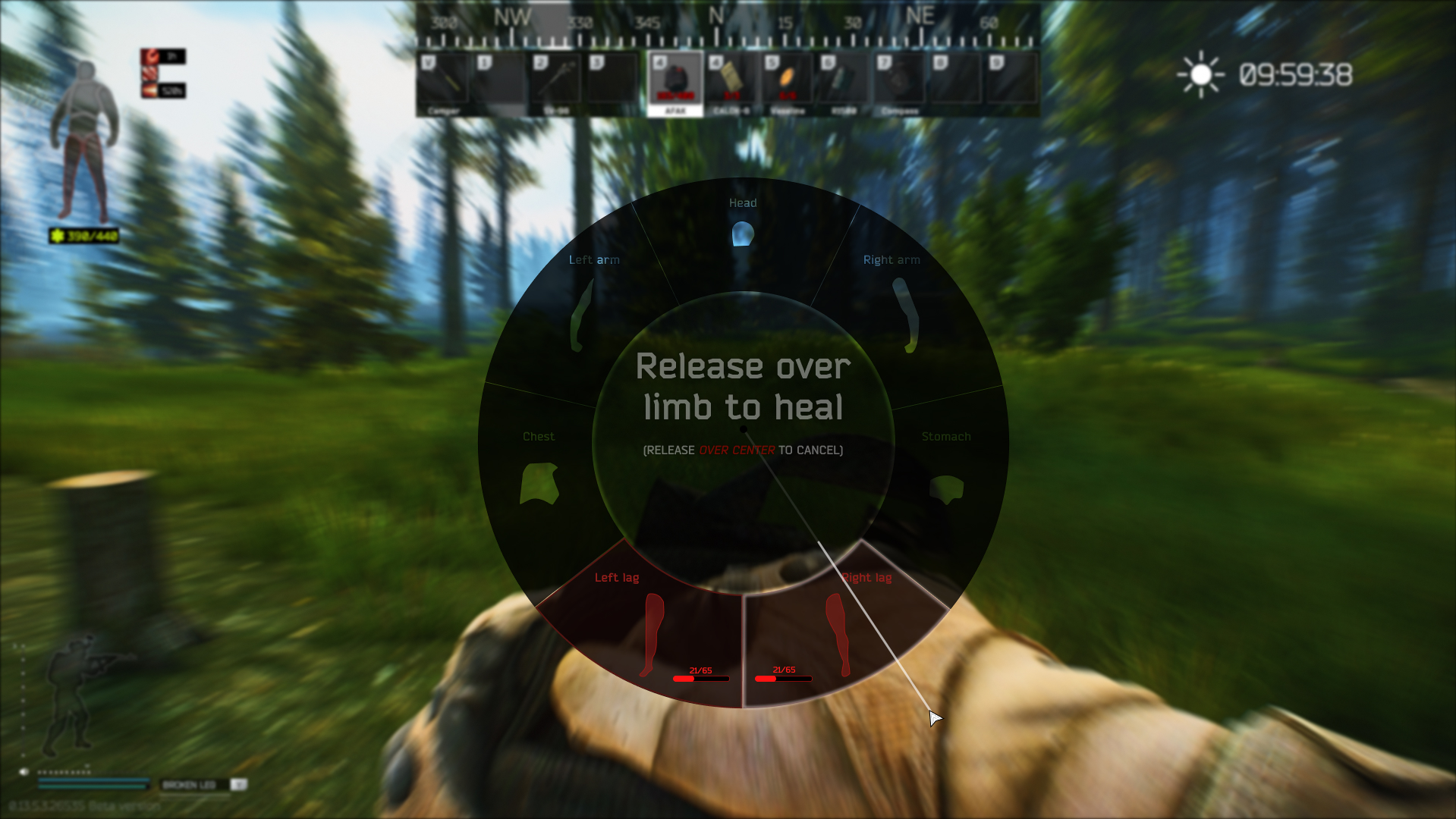
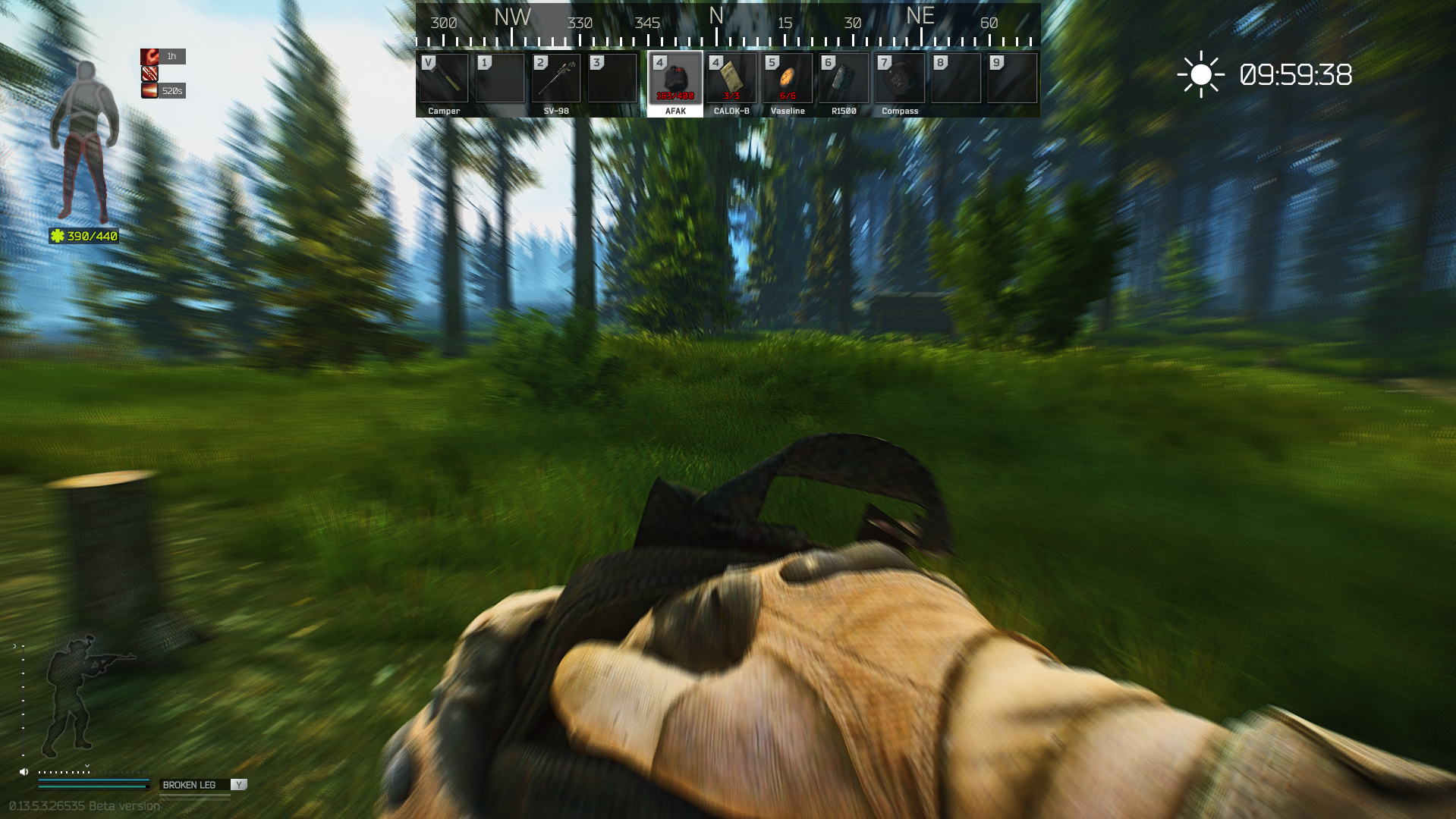
Raid UI Enhancements
Goal: Improve player awareness and combat efficiency.
Key Changes:
- Always-visible health bar with debuffs
- Overlay UI for grenade/heal wheels (with focus blur)
- Top HUD strip for time, compass, and weather
Settings Enhancements
Goal: Reduce repetitive visual setup and streamline trading.
Key Changes:
- PostFX presets: create, save, delete configurations
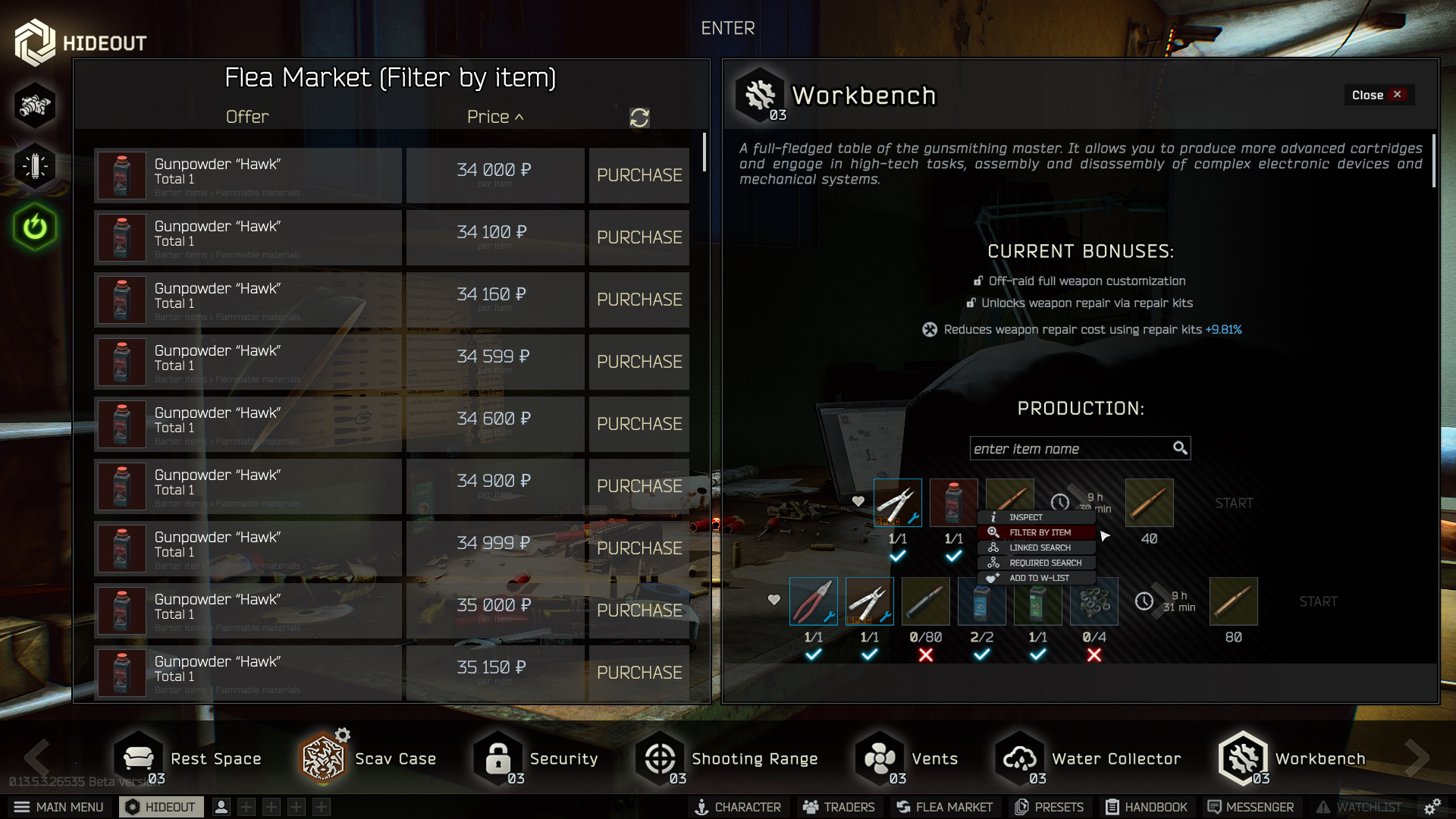
- Contextual flea market: item filter opens inline
- "Place Offer" opens instantly without screen switch
Flea Market
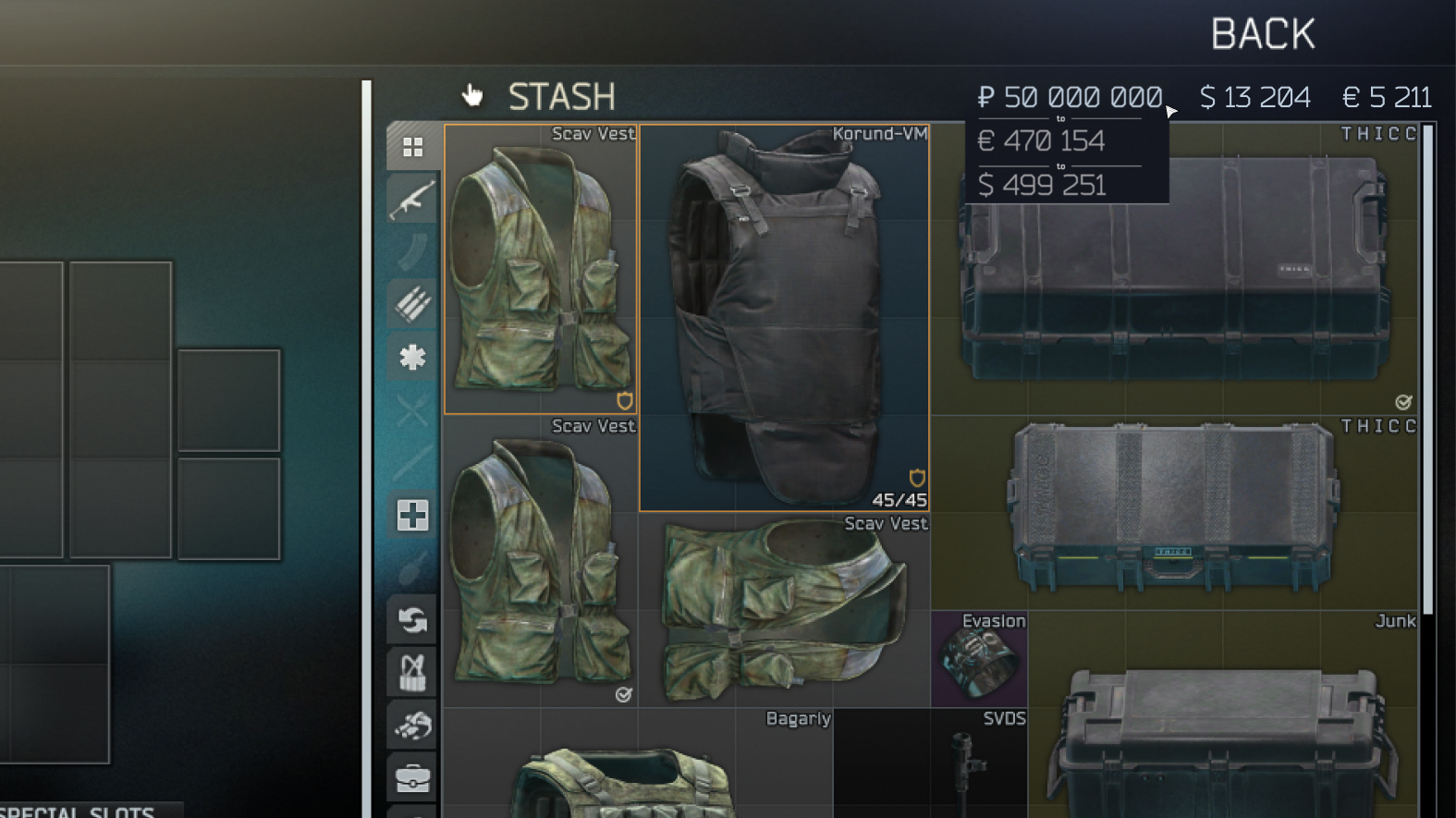
Goal: Minimize screen-switching and improve item interactions.
Key Changes:
- Embedded item filter results without leaving stash
- Auto-list offers and quick "Place Offer" action from the same screen
- Presets allow users to instantly apply favorite graphic settings
Retrospective and Learnings
Escape from Tarkov’s interface introduces unnecessary friction in both survival and social systems. Players must open the inventory for basic real-time information, like health, hydration, buffs, or grenade type, interrupting the flow of gameplay. Social features are also limited or inefficient — there’s no way to view online friends, create squads, or message teammates easily. Combined with missing presets and redundant workflows, even simple tasks like buying or crafting items become slow and frustrating.
- Reduce time spent on essential actions like buying, crafting, and communicating
- Surface key survival stats without breaking immersion
- Improve the visibility and flow of social features (online status, team invites, messaging)
- Streamline the interface to support faster decisions in high-stakes scenarios
Research & Discovery
To identify key UI and accessibility pain points in Tarkov by gathering feedback from diverse players, focusing on improving information clarity, social features, and inventory interactions.
Key findings from User Interviews
- Information Gaps: Players struggle to find critical status info (buffs/debuffs, hydration, health, compass) without opening the inventory.
- Social Friction: Friend list lacks online status visibility and makes group creation unintuitive; players can’t send invites from raid lobbies.
- Grenade Frustration: 80% of players throw grenades without knowing the type; only a few bind grenade types manually at raid start.
- Marketplace Overload: Majority spend their time in the Flea Market selling, which is repetitive and poorly optimized.
- Crafting Inefficiency: Users must manually look up crafting recipes each time, causing unnecessary friction.
- Quest Confusion: Players frequently search third-party websites for quest locations, indicating a lack of in-game guidance.
Competitive Analysis
To benchmark Tarkov’s UI, I analyzed similar games across key areas like crafting, in-raid feedback, and social systems. This revealed clear usability gaps and informed design opportunities.
| Features & Tasks | |
|
|
|---|---|---|---|
| Social & Grouping Systems | In-game friend list but no online status or join lobby options. No friend requests in raid lobby | Full friend system with online status and easy party formation. Friend requests from group interface. | No in-game friend list; group invites require user IDs. Less intuitive group formation. |
| Inventory & Crafting UI | FComplex inventory and crafting system. Powerful weapon customization but overwhelming. Mission info often hidden. Fast trader switching via shortcuts | Typical FPS inventory, no crafting. Intuitive weapon customization. Clear mission assignments | Classic RPG-style inventory and crafting. Intuitive but punishing. Clear stash UI, no trader shortcuts |
| In-Raid HUD & Vital Information | Shows raid time, posture, vital stats, hot bar. Inventory opened manually | Displays map, raid time, stats, compass, weapon shortcuts with grenade type commands | Shows map, raid time, stats, buffs/debuffs, compass, hot bar. Inventory manual access |
| Weapons & Utility Shortcuts | Predetermined weapon shortcuts; utility items assigned manually | Predetermined shortcuts for weapons and utilities | Shortcuts exist but must be placed manually |
| Visual Design & Thematic Consistency | Realistic post-war environments; gritty, immersive detail | Vibrant landscapes mixing nature and war zones | Dark, tense RPG dungeon style atmosphere |
Key Competitive Analysis Findings:
- Social Systems: Tarkov lacks online status indicators and easy lobby joining compared to competitors like Warzone DMZ
- Inventory Management: Tarkov's system is powerful but overwhelming; competitors offer more intuitive experiences
- In-Raid Information: Missing compass and clear utility shortcuts that other games provide
- Weapon Shortcuts: Manual utility assignment creates friction compared to predetermined systems
- Visual Design: Maintains strong thematic consistency with realistic post-war environments
Define (Syntesis)
Key Insights
- Tarkov’s full HUD hiding enhances immersion.
- Competitors like Dark and Darker improve awareness with buffs/debuffs and compass overlays.
- Social usability (e.g. friend status visibility, group tools) is a key advantage in Warzone but missing in Tarkov.
Carlos, the Hardcore Strategist
Hardcore FPS & RPG Player
Basic Info
- Age: 24
- Occupation: Barman
- Location: Dublin, Ireland
Behaviors & Habits
- Plays games 6 days a week
- Prefers multiplayer games with friends
- Likes realistic mechanics
- Searches for tutorials and new team members online
- Shares gaming content regularly
Goals
- Quick access to critical raid info
- Efficient crafting and item management
- Seamless squad formation and communication
Frustrations
- Cannot see online friends’ status
- Died selecting flash bangs in-raid
- Buff/debuff timers not visible in gameplay
- Needs to look outside game for mission info
- Spends too much time crafting and buying items
“I love Tarkov, but I shouldn’t need three tabs open just to survive a raid.”
Emma, the Casual Explorer
Casual & Social Gamer
Basic Info
- Age: 21
- Occupation: University Student
- Location: Lisbon, Portugal
Behaviors & Habits
- Plays 1–2 times a week
- Likes games with a casual or social focus
- Avoids overly complex mechanics or menus
- Often frustrated by cluttered UI and hidden information
Goals
- Wants to spend more time enjoying the game, less time figuring out UI
- Needs better onboarding and clear feedback
- Values clarity, ease of use, and helpful guidance
Frustrations
- Struggles with UI complexity, navigation, and learning curve
- Gets lost in menus or misses important info
- Finds learning curve steep and overwhelming
“Playing should be fun, not frustrating.”
User Journey Map: Carlos Needs to Throw a Grenade Under Pressure
Stage
Action
Thoughts
Emotions
Pain Points
Opportunities
1. Enemy approaching
Hears enemy movement nearby
“I need to frag them before they push.”
😬 Alert
Must react fast—needs instant grenade access
Add a quick‑select grenade wheel
2. Realizes grenade not equipped
Glances at hotbar and sees no grenade assigned
“I forgot to slot my grenades.”
😰 Pressured
Grenades must be pre‑assigned; slows reaction
Auto‑slot last‑used grenades or drag‑to‑throw
3. Opens inventory
Opens inventory to assign a grenade
“Wasting time opening my bag.”
😖 Frustrated
Takes eyes off fight; vulnerable
Inventory‑free selection UI (radial/context menu)
4. Assigns to slot
Drags grenade to hotbar slot
“Hope I finish before they push.”
😓 Anxious
Slot management is slow mid‑combat
Hold‑to‑open grenade menu for assignment
5. Attempts to throw
Presses G → throws grenade from slot 1 by default
“Wrong type—now I’m exposed!”
😡 Irritated
Default key cycles slot order; no way to pick specific grenade fast
Implement a grenade quick‑select wheel or cycle toggle
Carlos's Grenade Challenge - Key Pain Points:
- Immediate Need: Enemy approaching, needs quick grenade access for tactical advantage
- Discovery Problem: Realizes grenades aren't pre-assigned to hotbar, causing hesitation under pressure
- Vulnerability Window: Must open inventory mid-combat, taking focus away from enemy threat
- Slow Assignment: Manual drag-and-drop to hotbar slots wastes precious time
- Wrong Selection: Default grenade key throws wrong type, exposing player to danger
Solution Opportunity: Implement quick-select grenade wheel and auto-slot system for faster combat response.
Feature Priorization Table
Carlos, the Hardcore Strategist
Hardcore FPS & RPG Player
Basic Info
- Age: 24
- Occupation: Barman
- Location: Dublin, Ireland
Behaviors & Habits
- Plays games 6 days a week
- Prefers multiplayer games with friends
- Likes realistic mechanics
- Searches for tutorials and new team members online
- Shares gaming content regularly
Goals
- Quick access to critical raid info
- Efficient crafting and item management
- Seamless squad formation and communication
Frustrations
- Cannot see online friends’ status
- Died selecting flash bangs in-raid
- Buff/debuff timers not visible in gameplay
- Needs to look outside game for mission info
- Spends too much time crafting and buying items
“I love Tarkov, but I shouldn’t need three tabs open just to survive a raid.”
Emma, the Casual Explorer
Casual & Social Gamer
Basic Info
- Age: 21
- Occupation: University Student
- Location: Lisbon, Portugal
Behaviors & Habits
- Plays 1–2 times a week
- Likes games with a casual or social focus
- Avoids overly complex mechanics or menus
- Often frustrated by cluttered UI and hidden information
Goals
- Wants to spend more time enjoying the game, less time figuring out UI
- Needs better onboarding and clear feedback
- Values clarity, ease of use, and helpful guidance
Frustrations
- Struggles with UI complexity, navigation, and learning curve
- Gets lost in menus or misses important info
- Finds learning curve steep and overwhelming
“Playing should be fun, not frustrating.”
User Journey Map: Carlos Needs to Throw a Grenade Under Pressure
| Stage | Action | Thoughts | Emotions | Pain Points | Opportunities |
|---|---|---|---|---|---|
| 1. Enemy approaching | Hears enemy movement nearby | “I need to frag them before they push.” | 😬 Alert | Must react fast—needs instant grenade access | Add a quick‑select grenade wheel |
| 2. Realizes grenade not equipped | Glances at hotbar and sees no grenade assigned | “I forgot to slot my grenades.” | 😰 Pressured | Grenades must be pre‑assigned; slows reaction | Auto‑slot last‑used grenades or drag‑to‑throw |
| 3. Opens inventory | Opens inventory to assign a grenade | “Wasting time opening my bag.” | 😖 Frustrated | Takes eyes off fight; vulnerable | Inventory‑free selection UI (radial/context menu) |
| 4. Assigns to slot | Drags grenade to hotbar slot | “Hope I finish before they push.” | 😓 Anxious | Slot management is slow mid‑combat | Hold‑to‑open grenade menu for assignment |
| 5. Attempts to throw | Presses G → throws grenade from slot 1 by default | “Wrong type—now I’m exposed!” | 😡 Irritated | Default key cycles slot order; no way to pick specific grenade fast | Implement a grenade quick‑select wheel or cycle toggle |
Carlos's Grenade Challenge - Key Pain Points:
- Immediate Need: Enemy approaching, needs quick grenade access for tactical advantage
- Discovery Problem: Realizes grenades aren't pre-assigned to hotbar, causing hesitation under pressure
- Vulnerability Window: Must open inventory mid-combat, taking focus away from enemy threat
- Slow Assignment: Manual drag-and-drop to hotbar slots wastes precious time
- Wrong Selection: Default grenade key throws wrong type, exposing player to danger
Solution Opportunity: Implement quick-select grenade wheel and auto-slot system for faster combat response.
A UX/UI redesign for Escape from Tarkov focused on reducing interface friction and improving real‑time interactions. Key enhancements include upgraded friend lists, more intuitive in‑raid HUD elements, and streamlined pre‑raid workflows — all aimed at boosting usability and immersion.
| Feature | Priority | Category |
|---|---|---|
| These 'Must Have' features form the core improvements necessary for enhancing gameplay and social interaction. | ||
| Create the status feature inside the friend list (online/offline/occupied) | Must Have | Friend List & Social |
| Add members of group as friends directly from the pre-raid screen | Must Have | Friend List & Social |
| Display buffs/debuffs and character info outside inventory | Must Have | Combat Enhancements |
| Grenade and Healing wheel for faster selection | Must Have | Combat Enhancements |
| Display Compass, world time, and weather in raid | Must Have | Combat Enhancements |
| Create a better layout on the “Change Region” section on game launcher | Must Have | UI/UX Improvements |
| Save pre-set of Post Effects and configs across wipes | Must Have | Quality of Life |
| Amplify typography size setting | Must Have | Accessibility |
| Cloud save settings option | Must Have | Quality of Life |
| The 'Should Have' features add meaningful refinements that support and expand the core experience. | ||
| Send messages button direct into friend list | Should Have | Friend List & Social |
| Create a group system inside the friend list | Should Have | Friend List & Social |
| Improve contrast of unavailable servers in launcher | Should Have | UI/UX Improvements |
| Display opened boxes on top of inventory | Should Have | UI/UX Improvements |
| Add offer doesn't open in a pop-up window (new layout) | Should Have | Marketplace & Economy |
| Move “add friend button” from “messages” section to “friend list” section | Should Have | Friend List & Social |
| Display necessary XP to level up | Should Have | UI/UX Improvements |
| The 'Could Have' features are nice-to-haves that would further polish the interface but are lower priority. | ||
| Change iconography for barter necessary items | Could Have | UI/UX Improvements |
| Money conversion tooltip on hover | Could Have | Marketplace & Economy |
| Change friend list layout (pin to side) | Could Have | UI/UX Improvements |
| Open market in a new layout inside crafting section | Could Have | Marketplace & Economy |
| Display shortcuts and search bar in statistics section | Could Have | UI/UX Improvements |
| The 'Won’t Have': Lower-priority or strategically deferred items.. | ||
| Separate vendor messages from user messages | Won’t Have | Friend List & Social |
| Filter by item opens multiple windows without closing old | Won’t Have | UI/UX Improvements |
| Display profile and account info in a friend list popup | Won’t Have | Friend List & Social |
Ideate and Design
UX User Flow
This flow starts with game launch and loadout prep, followed by combat decisions. If the player is shot, they can quickly heal via a shortcut-activated wheel. Grenade selection is also streamlined through a radial menu. These adjustments reduce downtime, increase responsiveness, and enhance focus during critical gameplay moments.
Low-Fidelity Wireframes
Design Simplification & Early Concepts
These initial sketches explore fundamental improvements to Tarkov's most problematic user interactions. Each concept focuses on reducing friction and cognitive load while maintaining the game's hardcore aesthetic. Through rapid ideation and low-fidelity wireframes, I tested various approaches to core problems like friend management, raid coordination, and in-game awareness before committing to detailed designs.
Friend System Overhaul
Goal: Reduce social friction and improve clarity by introducing status indicators, friend requests, and group features.
Improved friend management and clarity by adding status icons, direct friend requests, and group functionality. Designed to reduce friction and support social interaction
Pre-Raid Group Coordination
Goal: Streamline team readiness with a 'Ready' state, inline friend list access, and invite/kick controls.
Streamlined team readiness with a "Ready" button for all members. Added friend invite/kick options and real-time friend list access to improve flow before raids.
Raid UI Enhancements
Goal: Boost in-raid awareness and efficiency with always-visible health info, overlays for grenades and healing, and contextual HUD elements.
Boosted in-raid awareness with always-visible health, buffs/debuffs, and optional overlays (weather, compass, time). Introduced a contextual grenade wheel with focus blur for clarity.
PostFX & Flea Market QoL
Goal: Minimize screen switching and simplify item management with presets and inline market interactions.
Reduced screen switching by embedding item filtering and trading actions directly into context. Users can now manage PostFX presets intuitively.
Settings Enhancements
Goal: Speed up visual customization and trading setup with PostFX presets and a streamlined flea market overlay.
Identified friction in visual and market settings. Introduced PostFX presets for faster customization and a streamlined flea market overlay to reduce navigation steps and speed up item interactions.
High-Fidelity Design
Refined Design Solutions & Implementation
Building on the early concepts, these high-fidelity designs showcase the final visual direction and detailed interactions. Each solution addresses specific user pain points identified during research, with refined aesthetics that maintain Tarkov's authentic feel while dramatically improving usability and workflow efficiency.
Friend System Overhaul
Goal: Reduce social friction and improve clarity.
Key Changes:
- Clear status indicators (online, in raid, away, hidden)
- Direct friend request and accept flows
- Group creation with public/private toggle
Pre-Raid Group Coordination
Goal: Improve team flow and readiness.
Key Changes:
- "Ready" state required for all members before raid
- Kick/invite controls embedded in group panel
- Inline access to friend list during prep
Raid UI Enhancements
Goal: Improve player awareness and combat efficiency.
Key Changes:
- Always-visible health bar with debuffs
- Overlay UI for grenade/heal wheels (with focus blur)
- Top HUD strip for time, compass, and weather
Settings Enhancements
Goal: Reduce repetitive visual setup and streamline trading.
Key Changes:
- PostFX presets: create, save, delete configurations
- Contextual flea market: item filter opens inline
- "Place Offer" opens instantly without screen switch
Flea Market
Goal: Minimize screen-switching and improve item interactions.
Key Changes:
- Embedded item filter results without leaving stash
- Auto-list offers and quick "Place Offer" action from the same screen
- Presets allow users to instantly apply favorite graphic settings
This project started as a visual polish effort but quickly evolved into a broader UX rethink. By focusing on real user friction points — from tedious item management to frustrating raid interactions — I prioritized meaningful changes that enhanced both usability and immersion. The process highlighted the importance of user feedback, smart scope management, and iterating with purpose.
Key Takeaways
- Small UI changes can spark major user feedback and engagement.
- Clear, intuitive design reduces frustration in high-stakes environments.
- Quick access to frequent actions (healing, grenades) improves retention.
- Removing redundant steps and microinteractions greatly improve usability.
- Transparency and iterative design build user trust.
What I Improved
- Simplified friend list interactions and status indicators.
- Enhanced pre-raid coordination with real-time friend info.
- Added contextual HUD info during raids.
- Reduced time lost switching between menus in the flea market and settings.
- Enabled presets for quick, repeatable customization.
If I Had More Time
- Improve stash UX with personalized icons and layouts.
- Rework inventory pop-ups into smarter collapsible modules.
- Add more user profile customization options.
- Continue gathering and applying player feedback for future updates.
Escape from Tarkov has a passionate community and a UX foundation with great potential.
"Yes, that's how we work!"
- Knight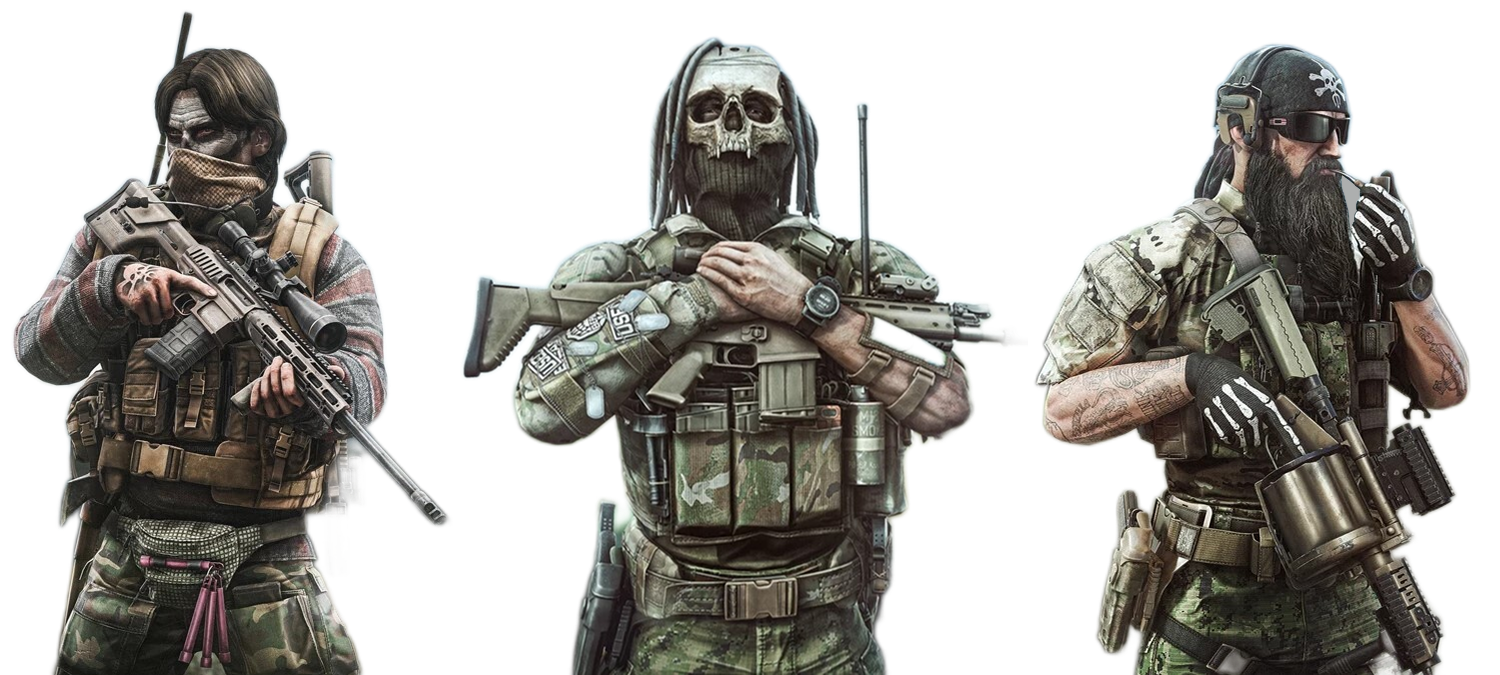
Thank you for reviewing this case study! If you'd like to discuss this project or explore my portfolio further, please don't hesitate to get in touch.